Live AI try-on for fashion stores
Tap it. Try it. Wear the look. Live AI try-on, in store and online.
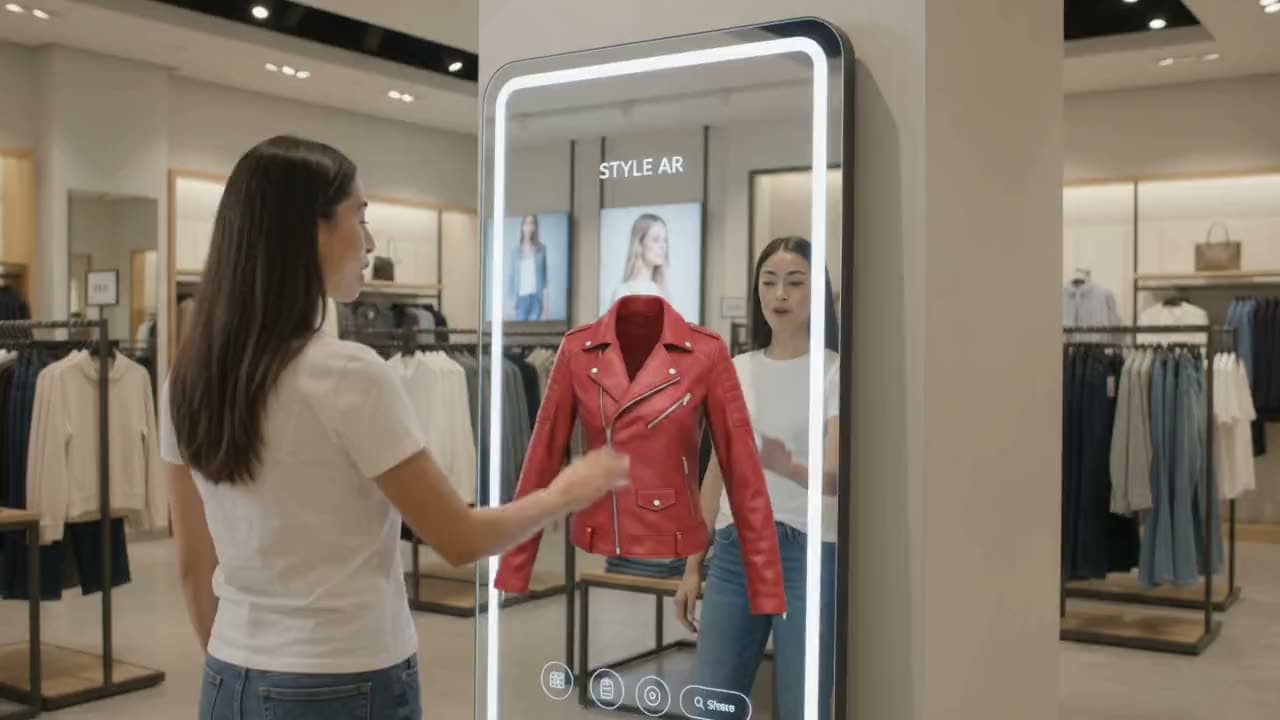
A live AI mirror for fashion stores. Shoppers see themselves wearing any piece in seconds, on the screen in your store or with one tap on your website. No fitting room, no queue.
No app, no 3D models. Just a camera and a screen.
Two ways in: for stores, and for shoppers
 For storesPut a live mirror on your shop floor.Shoppers see themselves in any piece and get their size, on your in-store screen and on your website.Create your storeFor shoppers · freeFind your size in twenty seconds.No sign-up. Your height, weight and an optional camera check, on your phone or laptop. Nothing is uploaded.Find my size
Works with every category: Outerwear, Dresses, Denim, Knitwear, Tailoring, Streetwear, Occasion wear
The idea
No fitting rooms. No queues. No guessing. Just a screen that turns into a mirror and the moment a shopper sees themselves in the piece they almost walked past.
The film
See it on you first.
One minute in a real store: walk up, raise a hand, try on outfit after outfit, get your size, and take the look home.
How it works
From photo to fitting, in three steps.
Set it up once. After that, a store assistant only has to pick a garment and press Start.
Upload your collection
Drop in clean garment photos, add categories and tags, and group them into collections.
Open the demo screen
Put the try-on screen on a laptop, tablet or in-store display, or add one script tag to your online shop.
Let shoppers try on
Pick a garment and the shopper sees themselves wearing it, live, in seconds.
- 0secdefault session, extendable to two minutes
- 0lineof code to add try-on to your online shop
- 0hrstake-home video link for shoppers
- 0raw camera frames ever stored
Trying on
Black bomber jacket
Credits
0
The demo screen
Everything staff need, on one screen.
- Two ways inThe shop-floor screen opens on Find my size or Try something on, so shoppers start where they want.
- Hands-freePoint and pinch, or hold a hand still, to press anything on the big screen from a couple of metres away.
- Find any garment fastSearch by name, SKU, tag or category, filter with one tap, or browse every collection at once.
- Live countdownSessions start at 30 seconds. Extend in 30-second steps while the shopper is still deciding.
- Live cost meterSeconds, credits and the remaining balance update as the session runs.
- Snapshots and compareCapture looks and put up to four side by side before the shopper chooses.
- Presentation modeFull screen for in-store displays, with layouts for laptops, tablets, phones and tall screens.
- Take-home videoWith consent, the try-on is recorded and the shopper scans a QR code to keep it.
New in · Dresses
Rust wrap dress
$89.00
<!-- one line, before </body> -->
<script src="…/widget/v1/vtryon.js" data-key="pk_…" async></script>
On your website
The fitting room, on every product page.
Online shoppers press Try it on and see themselves wearing that piece, live, in a popup. Nothing to install for them.
- One script tagThe button appears on product pages that match a garment, or exactly where you place it by SKU.
- Your lookSet the button's label and colours with a live preview, and the session length up to two minutes.
- Spending under controlTries per shopper, a daily session cap and an allow-list of your websites.
- A video to keepWith consent, shoppers download their try-on video when the session ends.
Your size · Wool overcoat
Fits well
- Chest
- Shoulders
- Waist
Size & fit
The right size, before the fitting room.
Shoppers enter their height and weight, then take a 20-second camera check. Every piece then shows their size and how it fits: snug, just right or roomy.
- In the store and at homeOn the shop-floor screen, on the shopper's phone, and on your product pages.
- A size on every pieceFit across chest, waist, hips, shoulders and length, and the next size when someone is in between.
- Your own size chartsStart from built-in EU, US and UK charts or import yours from a spreadsheet. Set fit and stretch per garment.
- Measured on the deviceThe camera picture is analysed on the screen or phone and never uploaded. Only the numbers are kept.
Features
Everything the shop floor needs.
Realtime AI try-on
Powered by a state-of-the-art live video AI model. No 3D models, no fitting room queue.
Find my size
Height, weight and a 20-second camera check give every shopper their size on every piece, and how it fits.
Hands-free screen
Shoppers point and pinch, or hold a hand still, to browse and start a try-on. No touchscreen needed.
Pairs with phones
Shoppers scan the code on the screen to pick looks, type their numbers and keep their sizes on their own phone.
Try-on on your website
One script tag adds a “Try it on” button to your product pages, with your own label, colours and limits.
Collections that sell
Categories, tags, published collections and smart rows like “Similar items” and “Recently tried”.
Any screen
Laptop, tablet, phone or a tall in-store display, with a full-screen presentation mode for the shop floor.
Your brand on screen
Your logo and brand colour on the try-on screen, so the experience feels like your store, not ours.
Pay per second
A simple credit balance with a live cost meter. Sessions start at 30 seconds and extend in steps.
Take-home videos
With consent, shoppers scan a QR code to keep a video of their try-on for 24 hours.
Usage insights
See your most tried garments, try-ons per week and credits used per day.
Private by design
The raw camera is never stored. Only the AI output is recorded, only with consent, and auto-deleted.
Privacy
Shopper privacy comes first.
- Every session starts with a consent screen for the shopper.
- Body measuring runs on the screen or phone: no photos are uploaded, only the numbers are kept.
- The camera feed is streamed for processing and never stored.
- Recordings contain only the AI output, and only with consent.
- Videos are deleted automatically after your retention period.
Ready for your
first try-on?
Create your store, upload a few garments, and start a demo, then add it to your website.